Emergency AC Repair for Urgent Breakdown Calls Today
If your air conditioning stops working during a hot Dallas, TX stretch, you want answers quickly and a clear plan for what to do next. This guide helps you narrow down the most likely causes, check a few safe items, and know when to call TemperaturePro.
It starts with a thermostat that used to keep the house comfortable. Then the system kicks on, runs briefly, and shuts down. Or it hums and blows warm air, and you can feel the temperature rising room by room.
In Dallas, TX, that kind of AC failure can happen fast, especially when the system has been working hard through long warm stretches. This guide will help you understand what to check right away, what clues point to common AC problems, and how to talk to a technician so you get help without wasting time.
- Quick answer
- What to check first
- Main things customers should understand
- Why this matters in Dallas, TX
- Common mistakes to avoid
- Customer checklist
- Frequently asked questions
Quick Answer
If your AC is not cooling, start with safe checks: confirm the thermostat setting is on “Cool,” the temperature is set below room temperature, and the system has power (breaker and disconnect). Look for obvious issues like a tripped breaker or a clogged filter. If the air is warm, the system won’t stay on, or you notice refrigerant-related signs (like abnormal icing or unusual performance), call TemperaturePro. When you reach out, share what the system is doing, how long it has been acting up, and any error codes you see.
What to Check First
Before you troubleshoot deeper, focus on items that are safe for homeowners to verify. These checks can rule out simple causes and help you describe the problem clearly to a technician.
Professional observation: When an AC “breaks” suddenly, it is often a symptom of an underlying control, airflow, or refrigerant issue. Simple thermostat or power problems are the easiest to spot, but they are not the only reason cooling stops.
Thermostat and settings
Confirm the thermostat is set to Cool and the fan is set appropriately. If you have a schedule mode, try overriding it to force a call for cooling.
Power to the outdoor unit
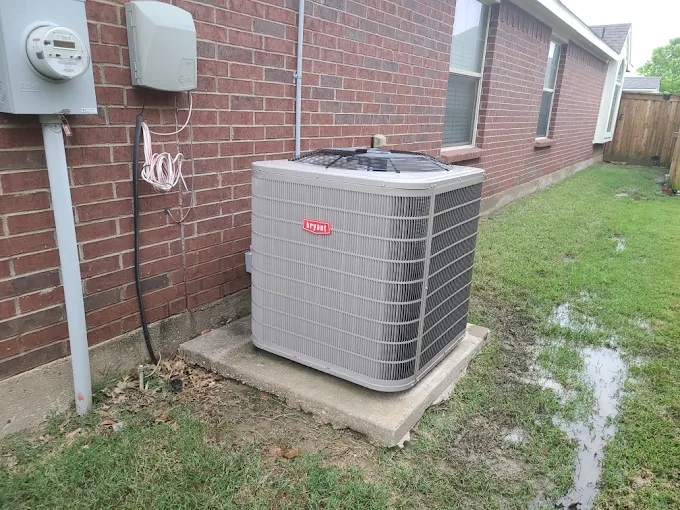
Check your breaker panel for a tripped breaker and ensure the outdoor unit’s disconnect (if present) is in the correct position.
Airflow basics
Look at the indoor filter. A heavily clogged filter can restrict airflow and contribute to cooling problems or abnormal system behavior.
Main Things Customers Should Understand
Once basic checks do not fix the issue, the next step is understanding what the AC system is trying to do. Cooling depends on airflow through the indoor unit, proper operation of the outdoor unit, and safe refrigerant pressures. If any one part falls out of its normal range, the system may struggle or shut down to protect itself.
| What you notice | What it can point to | What to do next |
|---|---|---|
| AC blows warm air | Control issue, airflow restriction, or refrigerant-related performance problems | Stop repeated resets, and schedule AC repair so the system can be checked with proper tools. |
| System runs briefly then stops | Protection shutdown due to abnormal conditions | Write down what it does (how long it runs) and contact TemperaturePro. |
| Ice or frosting on parts | Airflow problems or other issues that affect operating conditions | Turn the system off and wait for it to thaw before restarting. |
| Warm air with weak airflow | Restricted airflow or indoor component issues | Check the filter and vents, then call for service if cooling remains absent. |
One firsthand-style pattern we see in Dallas-area homes is this: the thermostat calls for cooling, the outdoor unit attempts to run, but the system cannot maintain normal performance. Sometimes that is tied to airflow or refrigerant conditions, and sometimes it is tied to electrical or control components. The important part is not guessing, it is using the system’s behavior as a clue and letting a technician verify the root cause.
Need urgent help with AC that won’t cool?
TemperaturePro can help you diagnose the problem and get your system back to comfortable cooling. Call for guidance on what to do next and what to watch for.
(469) 275-1624Why this matters in Dallas, TX
Dallas, TX summers can be relentless, and AC systems often run for long stretches. When a breakdown happens, the indoor temperature can rise quickly, and humidity can make the space feel uncomfortable even if the system is still attempting to operate. If you also have ductwork that is older or has minor leaks, the system may work harder to maintain cooling, which can expose problems sooner. TemperaturePro serves Dallas, TX and Richardson, TX with troubleshooting focused on restoring safe, steady cooling.
Common Mistakes to Avoid
When the AC is down, it is tempting to keep pressing buttons or trying quick fixes. Some of those actions can make the situation worse or make it harder to diagnose what happened.
- Repeatedly resetting the thermostat without checking power or airflow. This can cycle the system and confuse the symptom timeline.
- Running the system with a clogged filter or blocked return vents. Restricted airflow can contribute to cooling failures and abnormal operation.
- Trying to “thaw it” by forcing it on after you notice icing. If frosting appears, shut down and let conditions normalize before restarting.
- Ignoring warning signs like unusual performance or persistent warm air. Delays can allow minor issues to become bigger repairs.
- Assuming it is only a thermostat problem when cooling is absent. AC performance depends on more than temperature settings.
Customer Checklist
Use this checklist to prepare for service, especially if your AC is not cooling and you need fast, accurate troubleshooting.
- Confirm thermostat mode is set to Cool and temperature is below room temperature.
- Check indoor filter condition and replace it if it is severely clogged.
- Verify power: check the breaker and the outdoor unit disconnect (if present).
- Note what the system does: starts and stops, runs continuously, or only hums.
- Record any visible error codes or thermostat messages.
- Pay attention to airflow: is air weak, normal, or warm?
- If you see frosting or ice, turn the system off and allow it to thaw.
Representative scenario: Warm air after a short run
A homeowner in Dallas, TX reports that the AC starts, blows air for a few minutes, then switches off. When it restarts, the air feels warm instead of cool. They check the thermostat settings and confirm it is set to Cool. The filter looks dirty, and one return vent is partially blocked by storage. After replacing the filter and clearing the return path, the system still will not cool consistently. TemperaturePro can then focus on verifying the outdoor unit operation and checking system conditions that affect refrigerant performance and safe operation.
Frequently Asked Questions
How do I know if my AC issue is more than a thermostat problem?
If the thermostat calls for cooling but you still get warm air, weak airflow, or the system shuts down after a short run, the issue is likely not limited to the thermostat settings. Thermostats can be a cause, but AC cooling depends on indoor airflow, outdoor operation, and refrigerant performance. If basic checks like mode and temperature settings do not restore cooling, the safest next step is to have the system inspected so the cause can be verified rather than guessed.
What should I do if my AC starts, then stops repeatedly?
Repeated short cycling is a sign that the system is encountering an abnormal condition and may be protecting itself. Avoid repeatedly resetting the thermostat back and forth. Instead, note how long it runs, whether the air is warm or cool, and any error codes. If you see frosting or unusual performance, turn the system off and let it stabilize before attempting to restart. Then contact TemperaturePro so the system can be tested for the underlying cause.
Is it safe to run the AC if it is blowing warm air?
Warm air usually indicates the system is not achieving normal cooling conditions. If the system still runs, it can continue operating in an inefficient state. If you notice icing, shut the system off and allow it to thaw. If there is no visible icing but cooling is absent, it is still best to avoid extended run time and move toward proper troubleshooting. TemperaturePro can check airflow, operation, and conditions that affect refrigerant performance.
Can a dirty filter cause an emergency-style AC breakdown?
A severely clogged filter can restrict airflow and contribute to cooling problems, including poor performance and abnormal system behavior. While it may not be the only cause, it is one of the first safe items to check when AC stops cooling. Replacing the filter can help if airflow is the bottleneck. If the system still does not cool after restoring airflow, you should schedule service so technicians can diagnose other components and conditions that impact safe operation.
When should I call TemperaturePro for furnace or AC service?
Call TemperaturePro when your system will not perform its primary job, such as AC not cooling or shutting down unexpectedly. If you also use your heating system seasonally, you can plan maintenance in the off-season or when you notice issues like uneven warmth. For example, if you need heating help, you can explore furnace repair options. For AC-specific needs, TemperaturePro also provides AC repair and related cooling services.
Get your cooling back with TemperaturePro
If your AC is not cooling, blowing warm air, or cycling oddly, you do not have to guess. Call TemperaturePro for troubleshooting and repair guidance for homes in Dallas, TX and Richardson, TX.
(469) 275-1624
About TemperaturePro
TemperaturePro provides HVAC services for Dallas, TX homeowners, with support that extends to nearby areas like Richardson, TX. Whether you need AC maintenance, tune-ups, or repairs, the goal is the same: help your system run safely and comfortably through the seasons. If your air conditioning is failing, TemperaturePro can help you identify what is happening and move toward a practical repair path.